
Choosing the right Content Management System (CMS) directly impacts your website’s SEO performance. The best CMS for SEO will enhance your site’s loading speed and improve your indexation efficiency. A well-chosen CMS can boost rankings and drive more organic traffic over time.
Many people mistakenly prioritize aesthetics and user-friendliness over SEO capabilities when choosing a CMS. They may overlook how these decisions affect performance metrics like Core Web Vitals and indexation controls. This oversight can lead to long-term SEO challenges that diminish visibility and traffic.
After reading this article you’ll be equipped to make an informed choice about your CMS based on measurable SEO outcomes. You will learn to evaluate your options using a standardized criteria matrix that considers both performance and governance. This insight will position you to confidently select a CMS that complements your website goals.
What is the ‘best CMS for SEO’ and how should you evaluate it?

The best CMS for SEO varies depending on goals, team skills and site architecture. Factors like Core Web Vitals, technical SEO features and indexation controls play a key role. A comprehensive evaluation will help you align your choice with your project’s needs and future scalability.
Define success: from Lighthouse scores to indexation controls
To choose the best CMS for SEO, clarify your key performance indicators (KPIs) first. This includes assessing metrics like Core Web Vitals, Lighthouse performance scores, mobile responsiveness and Time to First Byte (TTFB). These KPIs will serve as benchmarks that guide your evaluation process.
You should also correlate these technical SEO features with specific outcomes related to crawl budget and indexation controls. For instance CMS options that optimize loading times can effectively enhance your site’s crawl efficiency. Ultimately the right platform will improve user experience leading to better rankings.
Decision intent vs capability fit
Your choice of CMS should reflect both your decision intent and the technical capabilities of your team. For example small teams with fewer technical resources may prefer a no-code option. Meanwhile larger teams might benefit from a developer-led stack that allows for customizations and flexibility.
Consider headless vs traditional CMS scenarios while making this evaluation. A headless CMS may offer significant advantages for dynamic content delivery but comes with complexity in terms of integration. Understanding these trade-offs will allow you to select a solution that fits your current needs while accommodating future growth.
Performance and rendering benchmarks that move rankings
The performance of your website significantly influences its SEO effectiveness. A CMS that supports fast rendering modes such as server-side rendering or static site generation can lead to improved user experience. Metrics like Largest Contentful Paint (LCP) and Cumulative Layout Shift (CLS) have become key indicators of site performance.
Core Web Vitals and rendering modes
Comparing different rendering modes like server-side rendering static site generation and Incremental Static Regeneration (ISR) is crucial. Each method impacts SEO differently. For instance server-side rendering often provides quicker loading times which benefits key metrics like LCP and TTFB.
Furthermore utilizing Content Delivery Networks (CDNs) for caching can enhance the performance of all rendering methods. Image optimization techniques such as responsive formats and lazy-loading also contribute to improving LCP scores. Prioritizing these factors will ensure your CMS is built for performance.
Implementation patterns that actually ship
Successful SEO implementation includes effective image CDN optimization and responsive design formats. Ensure any chosen CMS facilitates lazy-loading policies to enhance page performance. These strategies collectively support dynamic page load times and user retention.
Additionally strong caching strategies and cache invalidation during updates are necessary to maintain web performance. A CMS that supports edge rendering can help in achieving optimal delivery. Selecting a platform with robust caching capabilities should be part of your SEO-centered decision-making process.
Indexation controls and technical SEO features by necessity
To ensure effective SEO your CMS must offer strong indexation controls and technical SEO features. Without these controls your website may struggle to appear in search results. Ignoring this aspect may lead to costly SEO problems down the road.
Non-negotiables for metadata control
Control over metadata must be non-negotiable in your CMS evaluation. Key components include the ability to implement structured data schema, manage canonical tags and handle pagination effectively. Additional features should include customizable robots.txt files and meta-robots settings for directing crawlers.
Furthermore the platform offers automated XML sitemap generation and supports hreflang tags for multilingual sites. A CMS that integrates robust metadata control can significantly enhance your site’s visibility in search engines. This can lead to a measurable increase in organic traffic.
Crawl budget and large site architecture
Optimizing your crawl budget is vital particularly for larger websites. Proper handling of parameters and faceted navigation can impact SEO performance. A well-structured XML or HTML sitemap helps in ensuring comprehensive indexation across numerous pages.
Large enterprise-level sites have unique requirements for indexation controls. These can include managing complex site architectures while maximizing crawl efficiency. Select a CMS that provides tools for optimizing these aspects to ensure sustained positive SEO outcomes.
Editorial workflows and governance that prevent SEO regressions
Implementing effective editorial workflows will safeguard against SEO regressions. A CMS that incorporates robust governance features can minimize risks linked with content changes. Structured workflows keep track of editorial decisions that impact your site’s SEO health.
Content modeling for SEO and reusable components
Effective content modeling for SEO must include integration with schema markup editors. This allows for structured data to be embedded successfully. A CMS that supports reusable components promotes efficiency by reducing redundant work while ensuring consistency across pages.
Internal linking tools and guidelines can aid significantly in maintaining structured content. These features improve navigation and enhance user experience which can lead to higher rankings. Consider this when evaluating your options so you can streamline your editorial processes.
Role-based publishing and QA
Incorporating role-based publishing within your CMS helps maintain editorial standards. The system should provide mechanisms for setting workflow guardrails to avoid mistakes. Features like pre-publish checks for duplicate titles, noindex flags and broken canonicals can prevent significant errors.
Additionally incorporating redirect management capabilities ensures smoother user experiences when content changes occur. Ensuring quality assurance in the publishing workflow protects your site’s SEO integrity. Evaluate these functionalities as you consider a CMS to protect your SEO investment.
Growth-stage picks: small business ecommerce publishers enterprise!
Your team composition and site scale shape the best CMS choice. For example a no-code option often suits small business marketers who need quick solutions. Choice of headless or traditional CMS affects flexibility and control based on organizational needs.
Match CMS to team composition and site scale
Align the CMS with your team’s skill set and project scale. Marketer-led stacks may favor user-friendly interfaces. In contrast, development teams may benefit from a more customizable developer-led headless solution.
Performance targets like TTFB can differ significantly between small and enterprise setups. Understand the geographical reach of your audience and apply relevant CDN policies. This consideration helps narrow down options tailored to your growth stage.
Category-specific needs
Different sectors have distinctive SEO demands. For example ecommerce platforms require robust features for managing product variants implementing product schema and handling faceted filters for search. A suitable CMS aids in accommodating these unique specifications.
For media publishers the focus should be on managing large taxonomies and enhancing internal linking through automation. Ensuring a process for evergreen updates can help maintain content relevancy over time. Selecting the right CMS will streamline these efforts and enhance your SEO capabilities.
Migration and TCO: avoiding SEO debt while switching CMS!
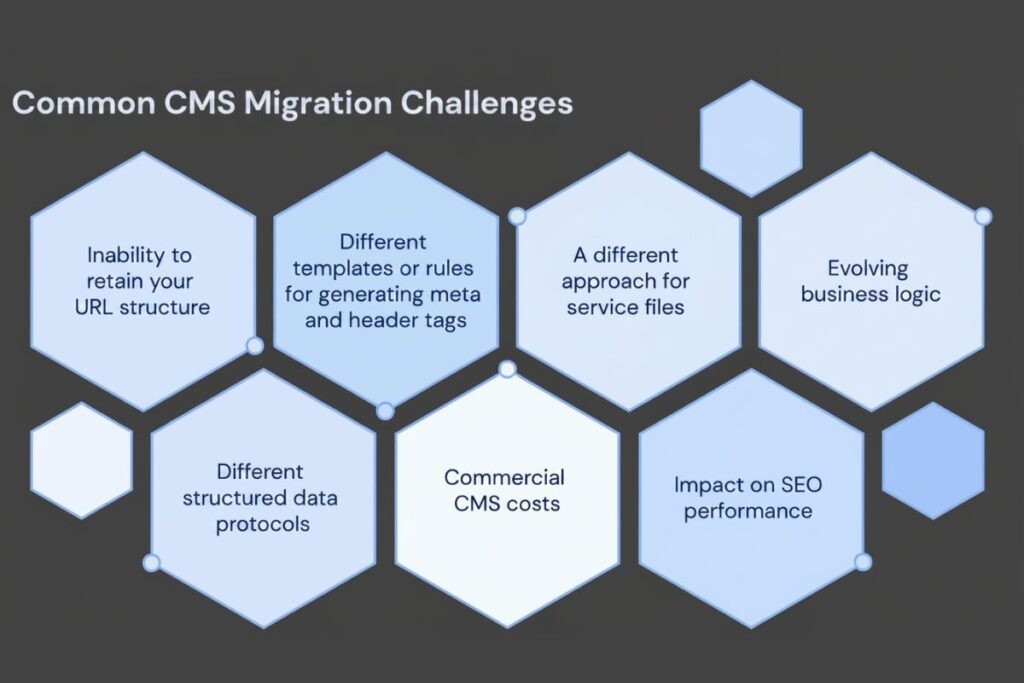
When migrating to a new CMS, being mindful of SEO debt is essential. A clear migration strategy must include detailed planning and execution to protect existing rankings. This consideration helps avoid pitfalls that could undermine your SEO performance.
CMS migration SEO checklist
A thorough checklist can safeguard your SEO during the CMS migration process. First meticulously map redirects to prevent lost traffic. Next validate content parity by ensuring that all existing material is accounted for on the new platform.
Lastly, ensuring continuity in analytics and planning sitemap submission timing helps maintain seamless transitions. A structured approach to migration can significantly mitigate the risks of SEO penalties. Your chosen CMS should simplify these processes to facilitate a smoother transition.
Total cost of ownership for SEO
Understanding the total cost of ownership (TCO) helps you assess long-term impacts on SEO. Be sure to factor in expenses for plugins developer time hosting and CDN when comparing CMS options. Maintenance costs also vary significantly between small businesses and enterprises affecting overall budget allocation.
Risk management practices including timely security updates and assessing plugin reliability play into long-term strategy. Analysing uptime signals can also forecast future needs and unexpected costs. A well-rounded understanding of TCO will help you make a smart choice that supports your SEO objectives.
Conclusion
Selecting the best CMS for SEO means harmonizing site performance indexation controls and governance with your specific requirements. Assess Core Web Vitals Lighthouse performance metrics and metadata management as your main criteria.
For ecommerce and publishing prioritize features like structured data internal linking and scalable sitemaps. Prepare for migrations with a focus on redirects and analytics continuity while evaluating TCO across hosting and maintenance options.
Map your current technology stack to the criteria outlined throughout this guide. Run Lighthouse tests and Core Web Vitals assessments using demo versions of your shortlisted CMS options.
Finally narrow down your choices to two contenders that meet your specific indexation and governance criteria before making a final commitment.
FAQs
Which CMS gives the most control over technical SEO settings
Self hosted CMS platforms usually give the most control over technical SEO settings. They let you edit server settings, SEO tags and robots directives directly without platform restrictions.
Can a hosted website builder still rank well in search
Yes a hosted website builder can rank well if you optimize content speed and mobile experience. Make sure you can control meta tags, canonical links and URL structure.
How much does site speed depend on the CMS versus hosting
Both the CMS and hosting affect site speed significantly. A lightweight CMS on poor hosting will be slow and a heavy CMS on fast hosting may still struggle so choose both carefully.
Do plugins and themes impact SEO performance
Yes plugins and themes can add code bloat and slow page loads which hurts SEO. Use only well coded lightweight extensions and test performance after changes.
Will switching CMS hurt my SEO long term
A migration can cause temporary ranking fluctuations if redirects and URL mappings are not handled properly. Plan a thorough migration with 301 redirects and monitor indexation to minimize impact.