Most people search this because they want quick setup steps. They copy an API key paste it into Janitor AI and expect perfect replies instantly. Sometimes it works. Most of the time it feels average.
The difference is not the connection.
The difference is configuration model selection and optimization.
If you want DeepSeek to actually outperform the default Janitor LLM and compete with premium models you need to set it up correctly and tune it intentionally. Let’s go deeper than basic instructions and build this properly.
Understand What You Are Connecting
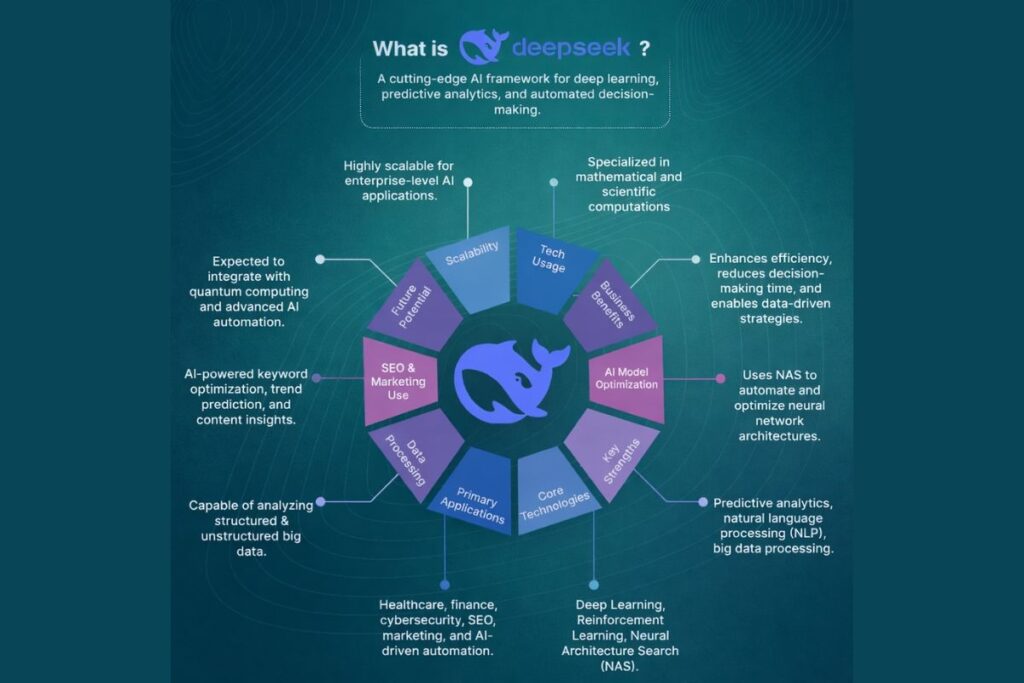
Before you even open settings you need to understand the model ecosystem.
DeepSeek offers multiple versions such as R1 R1 0528 V3 V3 0324 and newer revisions like 3.1. These are not identical upgrades. They behave differently in tone reasoning, depth memory handling and creativity.
- R1 focuses on structured reasoning and logical progression. It handles analytical conversations well and stays focused on task-oriented prompts.
- V3 leans toward smoother conversational flow. It performs better in immersive roleplay and long character arcs.
- V3 0324 improves consistency. It reduces personality drift and handles dialogue pacing more naturally.
- R1 0528 refines reasoning output and improves clarity in structured responses.
If you choose randomly you will blame the model. If you choose based on your use case you unlock performance. That decision alone separates average users from power users.
DeepSeek Model IDs and Endpoint Structure Explained
Many users struggle not because the model is bad but because they enter the wrong model ID or endpoint format. DeepSeek models require exact identifiers depending on the provider you use.
Some providers add prefixes, some require version tags and others expect specific naming formats. Before assuming something is broken, always verify the exact model string shown in your provider dashboard.
Copy it directly instead of typing manually. Small formatting errors cause most “model not found” problems.Understanding endpoint structure also helps if you switch between official API and proxy services.
Official endpoints usually follow a consistent base URL while proxy providers may use custom routing paths. Knowing this saves time and prevents unnecessary troubleshooting.
Official DeepSeek API vs Proxy Providers
You have two main integration routes.
The first route uses the official DeepSeek API. You create an account on the DeepSeek platform, generate an API key and connect through their official endpoint. This route gives you stable uptime predictable rate limits and full access to supported context windows. Once you pass the free tier you pay based on usage.
The second route uses proxy providers like OpenRouter Chutes MegaNova or other Nebula style services. These providers route requests to DeepSeek models through their infrastructure. Many offer limited free access or simplified onboarding.
Official API gives stability and long term reliability. Proxy access gives flexibility and lower entry cost but may introduce rate limits, temporary outages or regional restrictions.
If you plan to build serious long running chats, official access makes more sense. If you want to experiment or test configurations, proxy works fine.
Step by Step Setup Inside Janitor AI
Now we connect everything.
Open your Janitor AI dashboard. Navigate to API settings. Select Custom API. Choose OpenAI compatible configuration. Paste your endpoint URL. Insert your API key. Then enter the exact model ID for the DeepSeek version you selected.
Accuracy matters. A single character error in the model name will break the request. Save the configuration. Send a short test message. If the model responds correctly your integration works.
At this stage you only completed the mechanical part. Performance still depends on tuning.
Context Window Tokens and Why They Matter
Most guides mention tokens but do not explain their impact.
Every DeepSeek model supports a specific context window size. Depending on provider and version this may range from tens of thousands of tokens to over one hundred thousand. The context window defines how much conversation history the model remembers in a single exchange.
If you set maximum response tokens too low the model cuts answers mid-thought. If you set it too high on a limited proxy plan you trigger rate limits faster. Balance wins here. Use moderate response limits for casual chat.
Increase gradually for long roleplay scenes or complex analytical tasks. Do not push sliders to maximum just because you can. Efficiency produces better stability.
Temperature Top P and Output Control
Temperature directly influences creativity and randomness.
For reasoning heavy conversations using R1 or R1 0528 lower temperature values keep logic structured and precise. For narrative storytelling with V3 or V3 0324 moderate temperature produces expressive yet coherent dialogue.
Excessively high temperature creates unstable personalities and inconsistent tone. Extremely low temperature produces robotic answers.Start in the middle.
Adjust slightly after testing five to ten messages. Evaluate tone before making further changes. Controlled tuning always beats extreme settings.
Using Chat Memory and Context Management
Janitor AI allows memory usage across conversation turns. When enabled DeepSeek references previous dialogue and character context.
This dramatically improves long form roleplay, emotional continuity and relationship development between characters. However, long conversations accumulate noise. If replies begin drifting or referencing irrelevant details, clear conversation memory and restart the arc.
Strategic resets often improve quality more than constant rerolls. Power users manage context actively instead of hoping the model self corrects.
How to Optimize DeepSeek for Long Roleplay Sessions?
If you plan a multi hour or multi day roleplay you need a strategy.
First avoid pushing maximum token settings at all times. Instead allow the model to generate detailed responses but keep control over output length. Extremely long replies may feel immersive but they consume context space quickly.
Second, reinforce character identity inside your prompt occasionally. Not every message but at logical turning points. This keeps personality stable without overwhelming the model. Third clear memory intentionally after major arc completions.
Treat long roleplay like seasons of a show. Resetting context between arcs maintains clarity and performance. This structured approach prevents drift and improves consistency over time.
Advanced Prompt Engineering for DeepSeek
DeepSeek responds strongly to structured prompts.
Instead of vague character descriptions define:
- Character background
- Core personality traits
- Speech pattern
- Emotional tendencies
- Relationship dynamics
- Scene context
- Boundaries or behavioral rules
This structured instruction anchors the model, reduces personality shifts and improves immersive consistency. If you want deeper responses, explicitly instruct the model to describe internal thoughts, body language or environmental detail. Clear instructions drive richer output.
Cost Awareness and Token Efficiency
Many users ignore token efficiency until they see billing numbers.
Every request consumes input and output tokens. Longer prompts and longer responses increase cost. If you use the official DeepSeek API, long term efficient prompt writing directly reduces spending.
Instead of writing overly long system instructions keep them precise and structured. Remove redundant descriptions. Avoid repeating the same character rules in every message.
Smart prompt design improves output quality while keeping token usage controlled. Efficiency is not just about saving money; it also improves speed and stability.
Free Usage Strategy and Rate Limit Prevention
If you rely on proxy providers you must manage request pacing. Avoid rapid rerolls. Avoid sending multiple back to back messages within seconds. Do not treat the API like a stress test. Most rate limit errors occur because users generate excessive requests in short bursts.
When you see rate limit warnings pause. Wait before retrying. Natural pacing reduces blocks and keeps sessions stable. Smart usage extends free tiers significantly.
DeepSeek vs Other Models Inside Janitor AI
Many users compare DeepSeek with Claude Gemini or the default Janitor LLM.
DeepSeek V3 often delivers a stronger creative narrative flow than the base Janitor model. Claude models tend to produce polished structured responses but may cost more per token. Gemini sometimes applies stricter filtering depending on content type.
DeepSeek occupies a balanced position. It combines reasoning capability with creative flexibility while maintaining relatively efficient cost scaling. That balance drives its growing popularity in roleplay communities and advanced chat workflows.
When to Switch Models Mid Project
Sometimes a conversation feels stuck. Replies become flat. Creativity drops. Logic weakens.
Instead of forcing the same model, consider switching strategically. If narrative energy drops, moving from R1 to V3 can improve conversational flow. If reasoning becomes scattered, switching from V3 to R1 0528 may restore structure.
However, do not switch constantly. Make deliberate transitions at natural story breaks. This maintains coherence and avoids tone shock. Model switching becomes a tool not a random experiment.
Common Setup Errors and Their Real Causes
Invalid API key errors usually result from expired or incorrectly copied keys. Regenerate and paste carefully. Model not found errors happen when users mistype the model identifier. Cut off replies often result from low max token configuration.
Random connection failures usually stem from unstable proxy infrastructure rather than Janitor AI itself. Most problems originate from configuration mistakes not from the DeepSeek model.
Security and API Key Safety
Never share your API key publicly. Do not post screenshots that expose it. Do not paste it into untrusted platforms. If you suspect exposure, regenerate the key immediately from your provider dashboard.
Treat your API key like a password. Anyone who has it can generate requests under your account. Simple precautions protect you from misuse and unexpected charges.
How to Test If Your Configuration Is Truly Optimized?
Many users assume their setup works because the model replies.
Real testing requires structured evaluation. Send three types of prompts:
- Logical reasoning question
- Emotional dialogue scenario
- Detailed descriptive request
Evaluate coherence, consistency pacing and memory retention across responses. If the model handles all three smoothly your configuration is balanced. If one area underperforms, adjust temperature tokens or model versions accordingly. Testing intentionally prevents guesswork.
Why Does DeepSeek Performance Feels Inconsistent Sometimes?
Model performance can vary based on server load provider routing and conversation length. Proxy providers especially may route requests through different infrastructure layers. If output quality fluctuates do not assume the model changed.
It may be context saturation or temporary provider variation. Resetting conversation memory and restarting often restores quality. Understanding this prevents unnecessary frustration.
Scaling DeepSeek for Advanced Users
If you run multiple characters, bots or storylines create separate configuration presets inside Janitor AI. Use different model settings tailored to each purpose.
For example dedicate one preset to reasoning tasks with lower temperature and another to immersive narrative with moderate creativity. Separating use cases keeps output consistent and reduces constant setting adjustments. Advanced users think in systems not single chats.
Choosing the Right Model for Your Goal
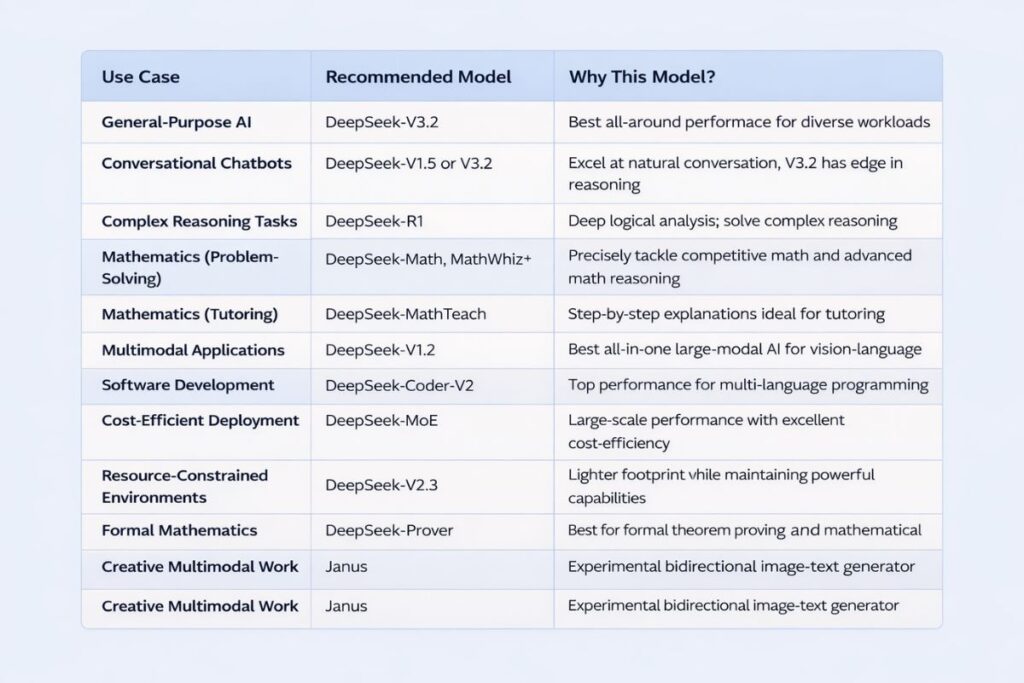
If you want immersive multi character roleplay V3 0324 often performs best. If you want logical debates or structured analytical tasks R1 0528 provides stronger reasoning clarity.
If you want balanced conversational flexibility standard V3 works reliably. Your objective should determine the model not online trends.
Conclusion
Setting up DeepSeek on Janitor AI is simple on the surface. You paste an API key, choose a model and start chatting. But real performance begins after connection. Model selection shapes personality. Context settings shape memory depth. Temperature controls tone.
Prompt structure determines immersion. Usage pacing protects stability. When you treat DeepSeek as a configurable system instead of a plug and play shortcut you unlock far better results.
Most users stop at connection. You now understand configuration optimization and strategic usage. That difference changes everything.
Does DeepSeek work on free Janitor AI accounts?
Yes as long as you provide a valid external API key. Janitor AI acts as the interface while DeepSeek processes the requests through your connected provider.
Why does DeepSeek feel different from the default Janitor model?
DeepSeek uses a separate training architecture and tuning strategy. Its reasoning patterns, creativity balance and context handling differ from Janitor’s native LLM which creates noticeable stylistic differences.
Can I switch DeepSeek models without losing conversation history?
You can switch models but responses may shift in tone or memory interpretation. For stable long arcs stick to one model per conversation thread.
How do I reduce response repetition in DeepSeek?
Lower temperature slightly and refine prompt instructions. Adding explicit style guidance and limiting repetitive phrasing in character rules also improves diversity.
Is DeepSeek good for long term roleplay campaigns?
Yes. When configured with proper context limits and structured prompts it handles extended arcs effectively. Managing memory resets strategically keeps output consistent over time.