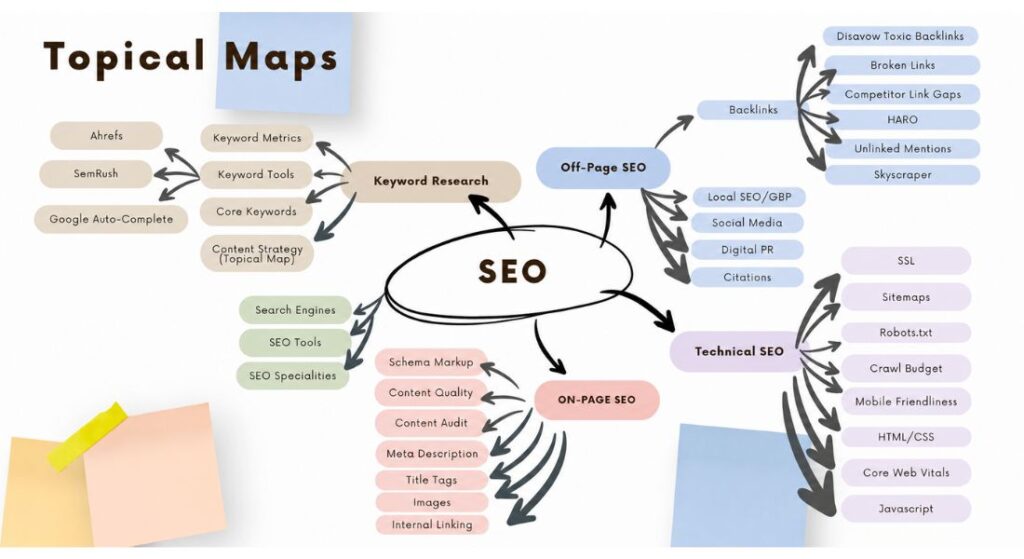
To complete a topical map SEO process you define a core topic, break it into content pillars, research supporting subtopics, cluster them around pillar pages and connect everything with strategic internal links. Done right this signals to Google that your site covers a subject with real depth not just scattered keywords.
Most sites skip the structure entirely and wonder why their content never ranks consistently. This guide walks you through every step from a blank page to a fully built content architecture that builds topical authority and drives organic traffic over time.
What Is a Topical Map in SEO and Why Does It Change How You Rank?
A topical map is a visual and strategic framework that organizes your website content into a hierarchy of topics, subtopics and supporting articles all connected through internal links. It moves your SEO strategy away from chasing isolated keywords and toward building a content ecosystem where every page reinforces the others.
Google does not just rank individual pages anymore. It evaluates whether your site demonstrates subject matter expertise across an entire topic and your content architecture is how you prove that.
How a Topical Map Differs from a Keyword List?
A keyword list tells you what terms to target. A topical map tells you how every piece of content relates to every other piece on your site. When you work from a keyword list alone you create content in silos, each article chasing a different term with no logical connection to your broader strategy.
Keyword clustering inside a topical map fixes this by grouping semantically related terms under the same content piece so one well-built article covers an entire subtopic instead of one narrow keyword.
Consider a site about digital marketing. “SEO basics” “what is on-page SEO” and “how to optimize a page” are three separate keywords but one subtopic. A topical map puts them in the same cluster under one supporting article linked to a pillar page on SEO strategy.
What Topical Authority Actually Means for Your Site?
Topical authority is the reputation your site builds when Google consistently sees you cover a subject completely not partially. Google’s E-E-A-T framework rewards Experience, Expertise, Authoritativeness and Trustworthiness and comprehensive content architecture is one of the strongest signals for all four.
When your site earns topical authority in a niche Google starts ranking your new content faster because it already trusts your domain on that subject.
You also rank for long-tail queries you never directly targeted because Google understands the semantic relationship between your pages and the broader topic they cover together.
Step 1: Define Your Core Topic and Content Pillars
Your core topic is the single subject your entire content strategy builds authority around. This is not your broadest niche. It is the most focused version of your expertise that still has enough depth underneath it to support multiple layers of subtopics, cluster articles and supporting content.
A vague core topic produces a vague content plan. Specificity here determines how fast you build authority and how clearly Google can classify your site.
How to Choose a Core Topic That Matches Your Business Goals?
Start by identifying the problem your business solves then choose the content topic that attracts the exact audience who has that problem. A project management tool does not need to own “productivity” as its core topic. It needs to own “project management strategies” because that subject connects directly to what the product does and who buys it. Broad topics attract traffic that never converts.
A focused core topic pulls in readers who already understand the problem your product solves which means they are far closer to taking action when they land on your site.
Breaking Your Core Topic into 5 to 10 Content Pillars
Content pillars are the major subtopic categories that sit directly beneath your core topic, each broad enough to support multiple supporting articles underneath it. For an email marketing site pillars might include list building email copywriting deliverability automation workflows and campaign analytics.
Aim for five to ten pillars. Fewer than five means you have not fully mapped the subject. More than ten on a new site spreads your authority signal too thin before you have earned enough domain trust to compete.
A complete topical map across these pillars typically contains 15 to 50 articles depending on niche competitiveness and how deep each pillar goes.
Step 2: Research Subtopics and Long-Tail Keywords for Each Pillar
Once your pillars are set go deep into each one and map out every question angle and subtopic that real users search for within it. This is where keyword research becomes subtopic discovery. You are not hunting for volume.
You are building a complete picture of what your audience needs to know about each pillar then matching those needs to actual search queries with measurable traffic potential.
Tools to Use for Subtopic Discovery
Ahrefs and SEMrush let you enter any pillar topic and surface related keyword clusters, question-based queries and long-tail variations sorted by search volume and keyword difficulty.
Google’s People Also Ask boxes and autocomplete results show you exactly how real users phrase their questions which is invaluable for conversational intent and voice search optimization.
AnswerThePublic maps question-based queries visually around any seed keyword and often surfaces angles your competitors have completely missed.
Wikipedia’s table of contents for your core topic reveals how subject experts structure a field of knowledge regularly uncovering subtopics that keyword tools do not surface. Collect 10 to 20 supporting subtopics per pillar and record each one with its estimated search volume before moving forward.
How to Identify Search Intent for Each Subtopic
Every subtopic you add to your map needs a search intent classification before you assign a content type to it. Informational intent means the user wants to learn something. Navigational intent means they want to find a specific brand or tool.
Transactional intent means they are ready to compare options or make a purchase. Assign the wrong content format to a query and your page will not rank no matter how well it is written because Google already knows from SERP analysis what format users expect.
Search each subtopic keyword in an incognito window, study the top five results and mirror the dominant format. If page one shows guides, write a guide. If it shows comparison pages, write a comparison. The SERP tells you the answer before you write a single word.
Step 3: Build Your Content Clusters Around Pillar Pages
A content cluster is the core structural unit of your topical map. It groups one pillar page with all its supporting articles into a single interconnected hub where every piece links back to the pillar and the pillar links out to each supporting article. This structure tells Google that your content covers a subject completely at multiple levels of depth which is the exact signal that drives topical authority and broad keyword coverage across the entire cluster.
The Difference Between a Pillar Page and a Supporting Article
A pillar page covers the full breadth of a topic at a high level and targets a broad head keyword with strong search volume. It introduces every major subtopic within the pillar but does not go deep on any of them because each one has its own supporting article to handle that depth.
A supporting article targets one specific long-tail keyword, answers one focused question completely and links back to the pillar page as the authority on the broader subject. Think of a pillar page on “email marketing” as the hub and a supporting article on “how to write a subject line that gets opened” as one spoke. The pillar mentions subject lines briefly.
The supporting article covers them in full detail with examples, data and a clear process. That relationship between the two pages builds semantic relevance across the entire cluster.
How Many Articles Do You Need Per Cluster?
Each cluster needs at least three to five supporting articles to register topical depth with Google but a well-developed cluster in a competitive niche typically contains eight to fifteen articles each covering a distinct subtopic with its own search intent and target URL.
Do not fill your cluster with thin content just to hit a number. One strong specific supporting article outperforms five shallow pieces covering the same ground from slightly different angles.
Every article in the cluster must answer a question the pillar page introduces but cannot fully resolve on its own otherwise it does not belong as a separate page.
Step 4: Analyze Competitors to Find Topical Gaps
Content gap analysis is one of the highest-leverage steps in the entire topical mapping process. Every competitor in your niche has blind spots: subtopics they skipped clusters they started but never completed and long-tail queries they ranked for accidentally without ever building proper supporting content around them.
Those gaps are your fastest path to ranking because you can publish content into spaces where the competition is thin, build early authority and use that momentum to compete on harder keywords inside the same cluster.
What to Look for in a Competitor’s Topical Structure?
Use Ahrefs Site Explorer to pull a competitor’s top organic pages and group them by topic. This shows you which content clusters they have built out fully and which pillars they have left underdeveloped. Pay close attention to their internal linking structure.
Pages that receive the most internal links from other pages on the same site are almost always their authority hubs and studying those hubs tells you where they have concentrated their topical strength.
A competitor with strong pillar pages but weak supporting content has left the entire long-tail layer of that cluster open for you to dominate with focused cluster articles.
How to Turn Their Gaps into Your Advantage?
Log every gap you find in your topical map spreadsheet and tag each one with search volume search intent and a proposed content type. Prioritize gaps with high conversational intent because natural-language questions are exactly how AI-powered search features like Google’s Search Generative Experience surface content in featured snippets and generative answers.
Publish gap content before you attack topics your competitors have already covered comprehensively. When you publish the only thorough answer to a question in your niche Google has no better option to rank and often moves your page to position one faster than any other type of content you can create.
Step 5: Map Existing Content and Plan New URLs
Before you create a single new article, audit your existing content and map it into your topical structure. Most websites with any publishing history have relevant articles sitting completely disconnected from the right pillar page with no internal links to related supporting content and no role in any content cluster.
Pulling those orphaned pages into your topical map activates authority you have already earned without writing a word of new content and it often produces ranking improvements within weeks of updating the internal link structure alone.
Auditing What You Already Have
Export all your published URLs and match each one to a topic and pillar in your map. Some pages will slot cleanly into existing clusters. Others will reveal new subtopics you had not planned.
A few will overlap with other pages on the same keyword which means you have a keyword cannibalization problem to fix before those pages can rank properly.
Use Google Search Console to check which queries each existing page already ranks for even weakly. A page sitting on page two for a subtopic keyword it was never properly optimized for is a quick win.
Update the content, add internal links from the pillar page and related cluster articles and many of those pages jump significantly within 30 to 60 days.
Assigning URLs to Topics Before You Write
Decide the URL slug for every new page in your topical map before anyone starts writing. Each slug should use the primary keyword for that subtopic in a clean readable format.
Fix the entire URL structure before content production begins because changing a URL after publication breaks your internal links, drops any backlinks pointing to that page and forces Google to recrawl and reindex the page from scratch.
Map every planned URL to its parent pillar page in your spreadsheet, mark it as new or existing and use that document as the single source of truth for your content team throughout the production process.
Step 6: Build Internal Links That Create Topic Loops
Internal linking transforms your topical map from a planning document into a content system that actively builds authority with every new page you publish. The baseline rule is that every supporting article links to its pillar page and the pillar page links back to every supporting article.
But the strategy that separates high-authority sites from average ones goes further by creating topic loops circular link paths where supporting articles also link to each other whenever a genuine contextual connection exists between them.
What a Topic Loop Is and How It Works?
A topic loop is a chain of internal links that keeps a user moving through related content on your site without ever needing to return to a search engine to find the next answer.
A reader on your article about “email subject line formulas” finds a link to “email preview text best practices” which links to “how to improve email open rates” which links back to the pillar page on email copywriting.
At every step the user finds the next logical question already answered on your site and Google reads this navigation pattern as strong evidence that your content satisfies topical search intent at the cluster level not just at the individual page level. That cluster-level satisfaction signal is a direct driver of improved rankings across every page in the hub.
Internal Linking Rules That Reinforce Topical Authority
Always use descriptive anchor text that includes the primary keyword of the destination page. Generic anchor text like “click here” or “read more” passes zero semantic context to Google about what the linked page covers.
“Email subject line formulas” as anchor text tells Google both the topic and the intent of the linked page reinforcing the semantic relationship between the two pieces of content.
Every time you publish a new supporting article go back to the pillar page and every related article in the cluster and add a contextual internal link to the new content. Schedule an internal link audit every 90 days to catch broken links and new linking opportunities that have opened up as your cluster has grown.
Step 7: Eliminate Keyword Cannibalization Before You Publish
Keyword cannibalization happens when two or more pages on your site compete for the same search query, splitting Google’s attention between them and causing both pages to rank lower than either would on its own.
A properly structured topical map prevents most cannibalization before it starts by assigning each subtopic to exactly one URL.
But when you map existing content into a new topical structure, cannibalization problems you never noticed before become visible immediately and you need to resolve them before they undermine the authority of the clusters you are building.
How to Spot Cannibalization in Your Topical Map?
Search your site for the primary keyword of each planned article using the “site:” operator in Google and check how many of your existing pages appear in the results. If two pages show up for the same query you have a cannibalization risk.
Cross-reference both pages in Google Search Console and look at which URL Google chooses to rank for that keyword over a 30-day period. If it alternates between the two pages week to week that is active cannibalization actively suppressing both pages.
Inside your topical map spreadsheet flag any two subtopics that answer the same core question from the same angle. Those flagged pairs need a resolution strategy before any new content goes into production around them.
How to Fix It Without Losing Rankings?
The most reliable fix for two cannibalizing pages is consolidation. Take the best content from the weaker page, merge it into the stronger page to make it more comprehensive, then set a 301 redirect from the weaker URL to the stronger one.
The 301 redirect transfers any backlinks pointing to the old URL and signals to Google which page should rank. The consolidated page almost always outperforms both originals because it now carries the combined authority of two pages and covers the subtopic more completely than either could alone.
If the two pages genuinely serve different search intents despite targeting similar keywords, differentiate them clearly in the title tag the H1 and the opening paragraph so Google can tell them apart without confusion.
How to Keep Your Topical Map Updated Over Time?
A topical map is a living strategy document not a one-time project. Search behavior evolves and new questions emerge as your niche competitors publish content that fills gaps you planned to target and Google’s understanding of your topic landscape shifts as your site grows.
Run a formal topical map audit every quarter. Pull your Search Console data to identify pages that have lost rankings or traffic check whether the issue is thin content missing internal links or a new competitor page that has overtaken yours and update accordingly.
Scan your keyword research tools for emerging queries within each pillar that you have not yet addressed because each new unanswered question in your niche is a cluster article opportunity waiting for you to claim it.
Add new content pillars only after your existing clusters are fully built out and showing clear performance. Expanding before your current clusters are complete splits your authority signal and delays the compounding effect that makes topical mapping so powerful over time.
Depth in a focused set of clusters consistently outranks shallow coverage spread across too many topics. Build your highest-value clusters first, measure what works and let your topical authority grow from a foundation of proven content before you expand the map outward into new subject territory.
Conclusion
Completing a topical map SEO process is not complicated but it does require doing the steps in the right order. You start with a precise core topic, build content pillars around it, research subtopics with the right tools, cluster your articles, intentionally audit what you already have, link everything together in topic loops and fix cannibalization before it costs you rankings.
The sites you see dominating search results in competitive niches did not get there by publishing more content. They got there by publishing smarter content inside a structure that Google could understand and trust.
Start your topical map today, prioritize your first two or three clusters, publish with intention and let the compounding authority do the work from there.
FAQs
How long does it take to build a topical map from scratch?
Most sites complete a basic topical map in three to five days covering core topic selection pillar identification and subtopic research. Execution across all clusters typically takes three to six months depending on your publishing pace and team size.
Do I need a topical map if my site is brand new?
Yes a new site benefits the most from a topical map because it sets the right content architecture from day one. Building without one means you will likely create cannibalization and authority gaps that take much longer to fix later.
How many keywords should each supporting article target?
Each supporting article should target one primary keyword and three to five semantically related secondary keywords that share the same search intent. Targeting multiple unrelated keywords in a single article dilutes its topical focus and weakens its ranking potential.
What is the difference between a topical map and a content calendar?
A topical map defines what content exists and how it connects across your site. A content calendar defines when each piece gets published. The topical map comes first and drives every decision in the content calendar.
Can I use AI tools to build a topical map?
Yes, tools like ChatGPT and Ahrefs’ AI keyword suggestions can generate hundreds of subtopic ideas quickly. Always validate every AI-generated subtopic against real search volume data and your brand relevance criteria before adding it to your map.