JavaScript SEO is the practice of optimizing JavaScript-heavy websites so search engines can efficiently crawl, render and index their content. When a site relies on client-side scripts to build pages crawlers often receive an empty HTML shell instead of real content and that gap between what users see and what bots see is exactly where rankings disappear. This guide walks you through every layer of the problem and gives you a clear actionable fix for each one.
Why Search Engines Struggle With JavaScript-Powered Websites?
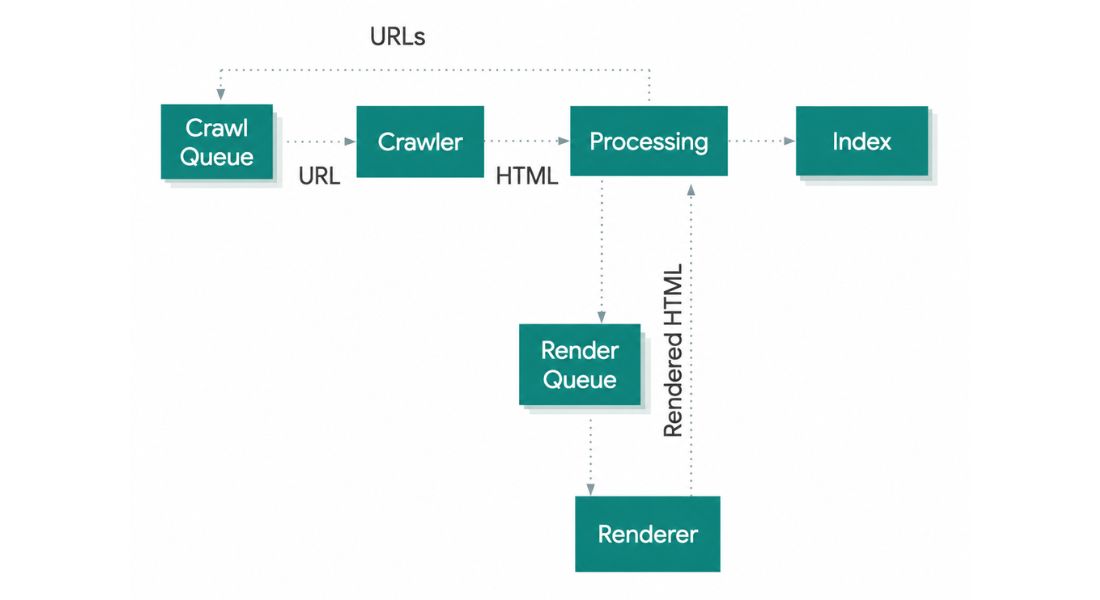
Your users see a fast beautiful site. Search engine crawlers often see something completely different. Google processes JavaScript websites through a four-step pipeline.
First Googlebot downloads the raw HTML in the crawl phase if your content lives inside JavaScript files Google cannot see it yet.
Second, the page enters a render queue.
Third, Google’s headless Chromium browser executes the JavaScript, builds the Document Object Model and extracts all links. Fourth Google indexes the fully rendered content.
That render queue is the core problem. It introduces delays measured in hours, days or even weeks depending on your site’s crawl budget and Google’s resource allocation.
Research from Onely confirms Google needs nine times longer to crawl JavaScript-powered websites compared to plain HTML equivalents. For competitive niches that gap directly translates into lost rankings, delayed indexation and invisible pages.
Smaller and regional search engines make this worse; many skip the rendering phase entirely and miss your content regardless of how well your JS executes.
Most AI crawlers used by Perplexity ChatGPT and others cannot render JavaScript at all. They send an HTTP request, receive the HTML response and move on.
If your page content lives entirely inside client-side scripts those crawlers see a blank shell. As AI-driven discovery grows this crawlability gap becomes a compounding visibility problem.
Rendering Strategy: The Decision That Determines Your Crawl Success!
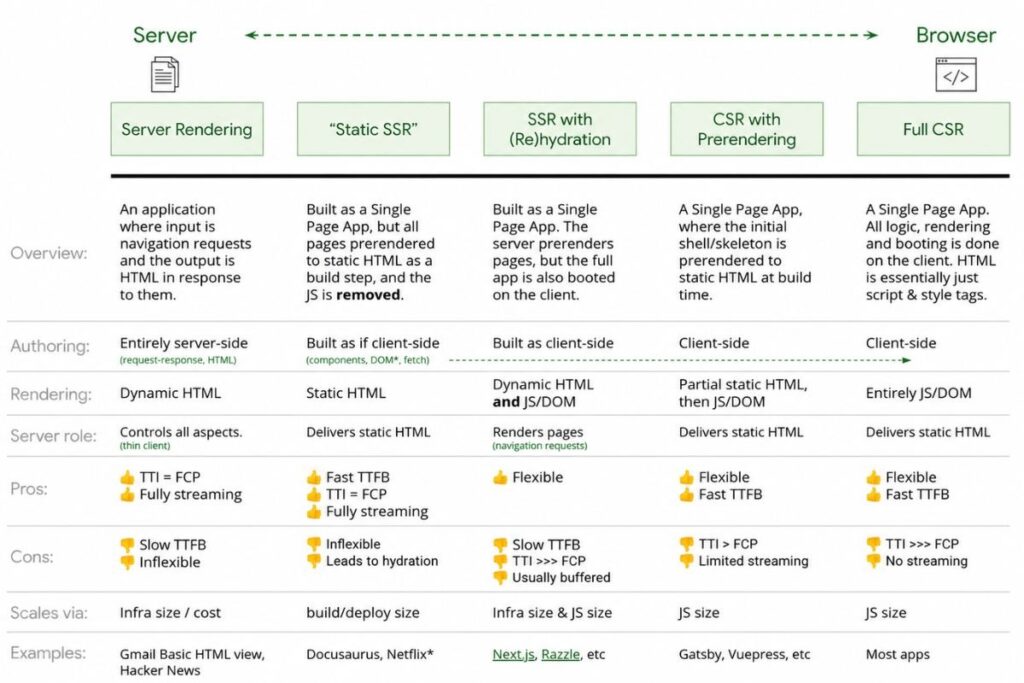
Every crawlability improvement traces back to one foundational question: what does Google receive in its very first HTTP response from your server?
Client-Side Rendering and Its Organic Visibility Risks
In a CSR architecture the server delivers a nearly empty HTML shell. JavaScript downloads executes in the browser, fetches data and builds the full page on the client side. Human visitors experience smooth app-like interactions. Search engine bots receive essentially empty markup.
Google can eventually render that page during its secondary processing wave. But “eventually” kills momentum. New product pages sit unindexed for days.
Blog posts miss their peak traffic window. Internal links buried inside JavaScript navigation never get discovered cutting off entire site sections from the crawl path.
Server-Side Rendering as the Crawl-Safe Default
Server-side rendering delivers fully built HTML to every visitor including crawlers before any JavaScript executes. Googlebot receives a content-rich document on its very first crawl request. No rendering queue. No Chromium dependency. No delay.
Frameworks like Next.js for React, Nuxt.js for Vue and Angular Universal implement SSR with minimal architectural overhead. For content-driven pages, product listings, blog articles, landing pages, local service pages – SSR is the correct default. The organic search benefits consistently outweigh the added server complexity.
Static Site Generation for Peak Indexation Speed
Static site generation pre-renders every page at build time and serves static HTML files directly. Googlebot receives fully-rendered markup with zero server processing time. Pages reach the index almost immediately after publication. For content that updates infrequently SSG is the most crawler-friendly architecture available.
Hydration: The Optimal Pattern for Modern Web Applications!
Next.js and Nuxt.js both implement hydration, a hybrid model where the server delivers pre-rendered HTML that crawlers read immediately then JavaScript attaches event listeners and activates interactivity in the browser.
Crawlers get full content. Users get a dynamic interactive experience. For most modern applications, balancing developer experience and search engine accessibility hydration is the strongest pattern available.
The Most Common JavaScript Crawlability Failures (And How to Fix Them)
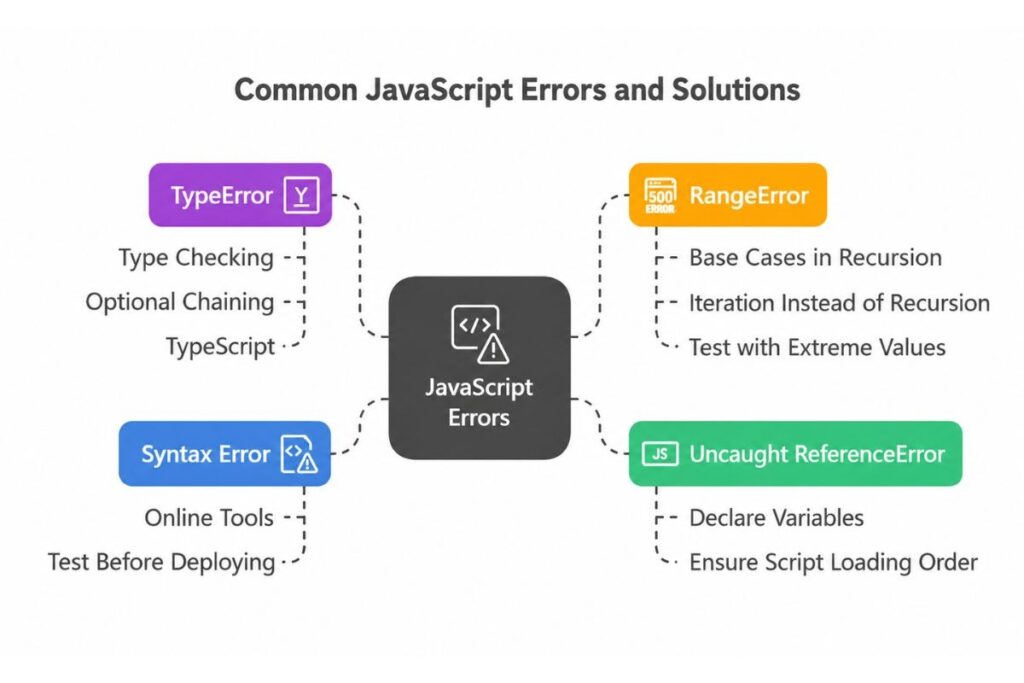
Even with a solid rendering strategy specific implementation mistakes silently destroy organic visibility. These are the issues that consistently surface in serious site crawl audits.
Critical Content Existing Only in the Rendered DOM
When your H1 tag body text product descriptions or internal navigation live inside JavaScript that only executes in the browser Googlebot’s raw HTML crawl pass sees nothing. Even if Google renders the page later, indexation delays reduce content freshness and shrink your traffic window.
Fix this by ensuring all ranking-critical content headings body copy navigation links canonical tags exist in the server-delivered HTML response. Use JavaScript to enhance and expand content never as its sole source.
JavaScript and CSS Files Blocked in Robots.txt
Blocking JS or CSS files in your robots.txt was common practice years ago to preserve crawl bandwidth. Today it actively prevents Googlebot from rendering your pages. Audit your robots.txt and remove every Disallow directive that restricts these resources Googlebot must access your script and stylesheet files to build pages correctly.
Meta Tags and Structured Data Injected After Page Load
Page titles, meta descriptions, canonical tags and robots directives must appear in the initial HTML response. If JavaScript injects these dynamically extremely common elements in single-page applications Google risks reading empty values or incorrect defaults during its crawl pass.
The same problem affects structured data. JSON-LD schema injected via JavaScript enters the render queue along with everything else. If Google reads your page before rendering completes your rich result eligibility disappears.
Use framework tools like Next.js Metadata API or React Helmet to inject SEO-critical head elements safely and ensure they appear in the source HTML. Server-side meta tag rendering is non-negotiable for any page you want indexed correctly.
JavaScript Navigation That Breaks Internal Link Discovery
When site navigation breadcrumbs and internal linking structures render entirely through JavaScript crawlers frequently miss the links during the raw HTML pass. Googlebot builds its crawl queue from links found in the HTML response. Links that exist only in the rendered DOM leave pages chronically under-crawled.
Always use standard anchor tags with functional href attributes for navigational links:
<!– Bad: invisible to crawlers –>
<span onclick=”goToPage(‘/product’)”>View Product</span>
<!– Good: crawlable by every bot –>
<a href=”/product”>View Product</a>
JavaScript click handlers and dynamic routing without proper href attributes are effectively invisible to crawlers.
Single-Page Application URL and Routing Problems
SPAs built with React Router Vue Router or Angular’s routing system use the History API to change URLs without triggering full page loads.
From a user perspective navigation feels instant. From a crawler’s perspective every unique URL you want indexed must return unique pre-rendered content from the server.
Two common mistakes compound this problem. First, if your SPA updates the URL client-side while the server returns the same empty shell for every path, individual pages cannot be indexed. Fix this with SSR or server-side routing that returns rendered route-specific content for every URL in your sitemap.
Second, avoid hash-based routing. Traditional URL fragments using # or #! are ignored by search engines entirely. A URL like yoursite.com/#/products cannot be indexed as a standalone page. Use the History API with clean URL paths instead yoursite.com/products so every route gets a proper indexable address.
Soft 404 Errors in Single-Page Applications
SPAs frequently display a “page not found” message using JavaScript on a page that returns a 200 OK HTTP status code. Search engines receive a success signal index, an empty or error page and waste crawl budget on URLs that carry no value.
Configure your server to return a true 404 Not Found status code for pages that do not exist. Relying on JavaScript to communicate an error state harms crawl quality and index cleanliness.
How to Audit Your Site for Rendering Issues?
You cannot fix what you cannot see. Before applying any solution, confirm exactly what crawlers receive from your pages.
Google Search Console URL Inspection
The URL Inspection tool shows Google’s rendered view of any page, what content appeared after JS execution, which resources loaded and current indexation status. It also lets you compare the raw HTML source against the fully rendered DOM. Gaps between the two reveal hidden crawlability failures.
Disable JavaScript in Your Browser
Toggle JavaScript off and navigate your site. Whatever disappears content navigation images text is completely invisible to AI crawlers and any bot that cannot execute scripts. This test gives you an immediate read on your CSR dependency.
Screaming Frog and Sitebulb Dual-Mode Crawls
Advanced crawling tools let you run two simultaneous audits, one without JavaScript rendering to simulate the raw HTML crawl and one with JavaScript rendering to simulate Googlebot’s full pass. Comparing both outputs reveals exactly which content links and meta tags exist only after script execution. This comparison is the foundation of every serious crawlability audit.
Google Search Console Coverage Report
A high volume of pages marked “Discovered currently not indexed” signals that Google found your URLs but sees thin or empty content during the initial crawl. Monitor this report regularly and treat spikes as rendering failure alerts.
Rendering Strategy by Site Type
Choosing the right rendering approach upfront prevents costly architectural rework later.
For e-commerce sites with large product catalogs SSR or SSG is mandatory. Product pages category pages and faceted navigation results carry your highest commercial ranking value. Client-side rendering for these pages wastes crawl budget and delays indexation at scale.
For SaaS marketing sites and landing pages SSR or SSG delivers the fastest indexation and the clearest content signals to search engines. There is no valid reason to use CSR for pages whose entire purpose is organic discovery.
For authenticated application dashboards and logged-in product interfaces CSR works fine. These pages sit behind authentication, carry noindex directives and benefit from the interactivity CSR enables without any organic search cost.
JavaScript SEO in the Age of AI Search Discovery
In 2026 crawlability optimization extends far beyond Googlebot. AI-powered discovery tools ChatGPT, Perplexity Gemini and others all use web crawlers to build knowledge and cite sources in generated answers. The majority of these crawlers cannot execute JavaScript.
If your content depends entirely on client-side rendering, AI crawlers see empty pages. Your content never surfaces in AI-generated answers regardless of how authoritative or relevant it is.
Getting your server-rendered HTML right is now a prerequisite for visibility across both traditional organic search and the AI discovery layer sitting on top of it. SSR and SSG are no longer just SEO best practices; they are baseline requirements for comprehensive search visibility.
Conclusion
JavaScript frameworks are not the enemy of search visibility. React Vue Next.js and Angular can all power highly crawlable well-indexed websites but only when rendering strategy and implementation details are handled correctly.
The difference between a JS-heavy site that ranks and one that stays invisible usually comes down to a handful of fixable decisions: whether critical content lives in the server response whether navigation uses proper anchor tags whether meta tags and structured data appear before scripts execute whether SPA routes return real server-rendered content and whether your HTTP status codes accurately reflect page existence.
Audit your rendering behavior, compare what crawlers see against what users see and fix the gaps systematically starting with your highest-traffic pages.
FAQs
Does Google fully render all JavaScript pages before indexing them?
No, Google renders pages in a secondary queue that can delay indexation by hours, days or weeks depending on your site’s crawl budget.
Can I keep using React or Vue without hurting my SEO?
Yes but you must implement SSR or hydration so crawlers receive complete HTML without depending on client-side script execution.
How do I know if my meta tags are rendering correctly for Google?
Use the URL Inspection tool in Google Search Console it shows exactly which meta tags Google read during its last crawl of any given page.
Do AI crawlers like GPTBot follow the same rules as Googlebot?
Most AI crawlers cannot render JavaScript at all so server-rendered HTML is even more critical for visibility in AI-powered search and answer tools.
What is the fastest way to fix CSR-related indexation problems on an existing site?
Migrate your highest-traffic and highest-value pages to SSR or SSG first this delivers the fastest indexation improvement without requiring a full architectural rebuild upfront.